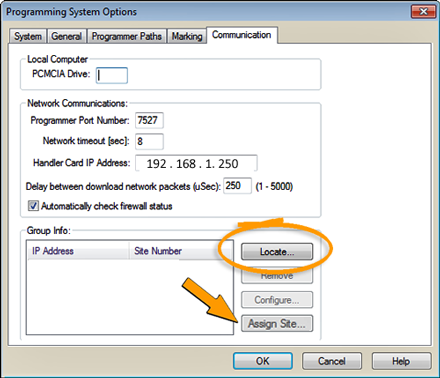
¤ Click Locate (circled) after installing Socket Adapters After programmers have been located, the Assign Site button (arrow) will be available.
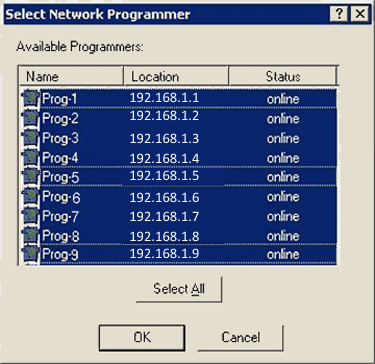
¤ To select all the programmers (shown selected here) click Select All and OK.
You may want to assign programmer site numbers if you have replaced a programmer on your PSV7000.
1. [Optional] Install a Socket Adapter onto each new programmer. (Installing Socket Adapters allows identification of site numbers more easily.)
2. Connect and turn ON air to the machine (if not already on).
3. Start TaskLink.
4. Navigate to System > Options > Communication tab. See Figure
|
|
|
|
|
¤ Click Locate (circled) after installing Socket Adapters After programmers have been located, the Assign Site button (arrow) will be available. |
¤ To select all the programmers (shown selected here) click Select All and OK. |
5. Click Locate.
6. When the Select Network Programmer dialog displays the programmers, control+click to highlight the desired programmers, or click Select All. Then click OK. See image above right.
7. Back on the Communication tab, highlight the first programmer IP Address listed and click Assign Site. Refer to image above left.
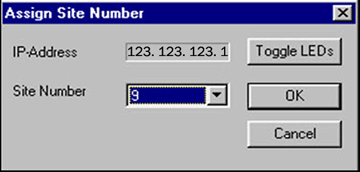
8. In the Assign Site Number dialog, use the Site Number drop-down list to assign site numbers. Click Toggle LEDs to see where the programmer is on the PSV7000 work surface (LEDs will blink momentarily). It is strongly recommended to assign numbers that correspond to the Work Surface (for consistency and future service). For Work Surface diagrams see your PS Machine online Help.
|
|
¤ Dialog for assigning site numbers. |
10. Select the next IP Address and repeat step 9 and step 10 until all desired programmers are assigned a number.
• • •